

FDBV
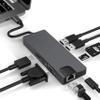
FDBV Docking Station USB Type C Hub Adapter 8 in 1 RJ45 1000M Gigabit Ethernet PD Charging HDMI 4K VGA 2*USB3.0 SD/TF Multi-Function for Windows 7/8 / 8.1/10, macOS X v10.0 or Above
75,27€
125,45€
-
 Order within 16 hours and 55 minutes to get between June 19 - June 25
 -
 Tracked Shipping on All Orders
-
 14-Day Returns
- Secure Payments
-
 24/7 Customer Support
Description
- This 8-in-1 USB-C Hub expands the limited USB connectivity of your computer with [an HD output port], [a Gigabit ethernet port (rj45 port)], [a USB-C charging port] , [a VAG port], [2 USB 3.0 ports], [an SD and TF card slot], [USB-C female Charger Port].
- USB C Hub to HD output: up to 4K UHD (3840x2160 @ 30Hz) or 2K / 1080p / 720p / 480p / 360p
- System requirements: Laptop with an available 8. USB-C port Windows 7/8 / 8.1 / 10, macOS X v10.0 or above operating systems
- USB C hub to Ethernet Lan Rj45 Adapter (RJ-45 port): 10/100/1000 Mbps. USB 3.0 Type-A port: Data transfer: up to 5 Gbps.
- SD / TF card slot: Supported memory card capacity: up to 512 GB, Read / Write speed: up to 104 MB / S
1. The USB-C female port of this product is only for charging USB-C laptops whose USB-C port supports USB Power Delivery (PD) and does not support data transfer.
2. A 4K-capable display and HDMl cable are required to achieve 3840x2160 resolution.
3. USB C hub to VGA Adapter: HD and VGA not simultaneously, resolution up to 1920 * 1080 P. a perfect solution for entertainment and work.
4. Charging USB Type-C port: Charging: (Charge only for laptop)
5. For stable connection connect an adapter to the hub when using high-power devices.
Tips:
1 ways to help reduce the USB 3.0 radio frequency interference to the wireless connection of some laptops.
2 Connect the laptop to a 5 GHz Wi-Fi network.
3 Connect devices (eg mouse and keyboard) to USB 2.0 ports on the laptop
4 Connect the USB 3.0 hub to the laptop with a high-quality 1-foot or longer USB 3.0 extension cable; keep USB 3.0 devices away from the host computer.
5 Use high-quality shielded USB 3.0 devices / cables / connectors.
Shipping and Returns
- We offer tracked shipping on all orders. Tracking information will be shared as soon as the order is dispatched.
- Please check the delivery estimate before adding a product to the cart. This is displayed for every product on the website.
- Available shipping methods and charges will be displayed at the time of checkout, depending on your exact location.
- All customers are entitled to a return window of 14 days, starting from the date of delivery of the product(s).
- Customers are advised to read our return policy for details of the return process, eligibility, refunds as well as cancellations or exchanges.
- In case of any issues or concerns about Shipping or Returns, please contact us and we will be happy to help.
FDBV.
FDBV Docking Station USB Type C Hub Adapter 8 in 1 RJ45 1...
75,27€
125,45€